Data Tagging
Binds business data (userData key-value pairs) to nodes of a 3D model. Typical use cases: industrial equipment IDs, floor/room info in buildings, e-commerce SKUs, digital twin sensor IDs, etc. Tags are exported as a standalone JSON file whose structure is directly compatible with Three.js userData — after loading the model in your frontend, attach the data by node name.
Layout
The Data Tagging page uses a three-column layout:
| Area | Function |
|---|---|
| Left: node tree | Shows the full node hierarchy with a live "tagged / total nodes" counter |
| Center: 3D viewport | Click to select nodes; selected nodes get an outline highlight; synced both ways with the tree |
| Right: data editor | Edit key-value pairs for the selected node; add/remove entries and apply JSON in bulk |
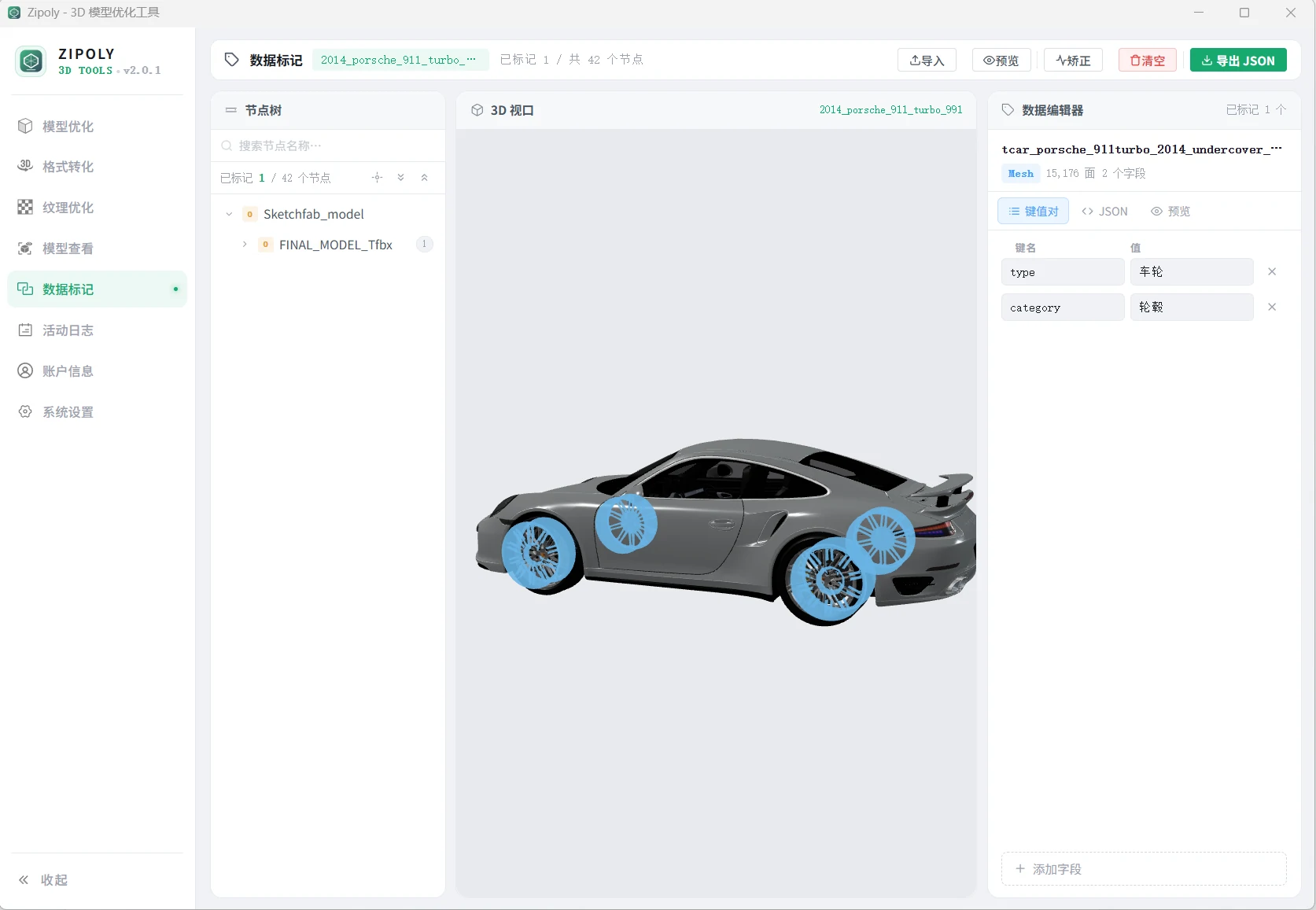
Basic Workflow
- Drag in or pick a model file (free tier ≤ 20 MB, licensed ≤ 500 MB)
- Browse the hierarchy in the node tree, or click the target node directly in the 3D viewport
- Add key-value pairs in the editor on the right, e.g.
Equipment ID = PUMP-0231,Type = Centrifugal pump - Tag other nodes the same way, then click "Export JSON" in the toolbar to save
Toolbar
| Button | Description |
|---|---|
| Import | Batch-import tags from a JSON file, auto-matched by node name |
| Preview | Preview all tagged nodes at once, with unified editing |
| Repair | Scan and clean up orphaned data (tags left behind after a node was deleted) and redundant data, keeping tags consistent with the model |
| Clear | Remove all tags from the current model |
| Export JSON | Export all tags as a JSON file for archiving or re-import |
JSON Editor Notes
The key-value editor and the "Preview" dialog both use the Ace editor (vue3-ace-editor + ace-builds) with JSON syntax highlighting. After packaging (Tauri / Windows), if the editor has no height, no scroll, or lines stack incorrectly, it is usually because the CSP blocks the editor's runtime-written inline style attributes. Ensure tauri.conf.json security.csp (object form) includes style-src-attr / style-src-elem directives allowing 'unsafe-inline' — Tauri injects a nonce into the main style-src at compile time, but only pollutes that directive, not the sub-directives.
Key Presets & Bulk Apply
- Common key names (e.g.,
id,name,type) can be inserted quickly via presets to avoid retyping - The editor supports bulk JSON apply: paste a JSON object to write multiple key-values to the current node in one click
Export Format
The exported JSON looks like this (default filename {model-name}-userdata.json):
{
  "meta": {
    "version": "1.0",
    "createdAt": "2026-08-02T10:00:00.000Z",
    "markedNodeCount": 2,
    "totalFieldCount": 3,
    "modelFileName": "factory"
  },
  "nodes": {
    "001": {
      "name": "Pump_0231",
      "data": { "EquipmentID": "PUMP-0231", "Type": "Centrifugal pump" }
    }
  }
}
The data field of each node is a plain key-value object — the same structure as Three.js object.userData, so you can assign it directly.
Tips
Node names are the matching key
JSON import and data repair both match on node names. Make sure node names are unique and meaningful at the modeling stage — avoid auto-generated names like Cube.001.
FAQ
Are tags stored inside the model or in a separate file?
A separate file. The exported JSON (default name {model}-userdata.json) lives alongside the model — the model itself is never modified; your frontend assigns each node's data to Three.js object.userData by node name.
How does my frontend read the tagged data?
Each node's data field in the exported JSON matches Three.js object.userData exactly — read nodes[nodeName].data and assign it to the corresponding object; no extra parsing needed.
Tagging hundreds of nodes one by one is slow
Two shortcuts: use Import to batch-fill from a JSON file matched by node name, or paste a JSON object into the editor to write multiple key-values to the current node at once. Common keys (id, name, type) can be inserted from presets.
What happens to tags when a node is deleted from the model?
Run the "Repair" toolbar action: it scans and removes orphaned data (tags whose nodes are gone) and redundant data, keeping tags consistent with the model.