Texture Optimization
Texture Optimization compresses standalone image files (loose textures not embedded in GLB): batch-convert PNG/JPEG/WebP into KTX2 (GPU-native, Basis Universal ETC1S/UASTC), WebP or JPEG, with optional proportional resolution scaling — for example, a batch of PNG/JPG textures exported from your modeling software.
How is this different from "Texture Settings" in Compression Optimization?
- Texture Optimization tab: processes standalone image files on disk (
.png/.jpg/.webp) and outputs standalone image files - Compression Optimization → Texture Settings: processes textures embedded inside GLB files and still outputs GLB
To compress textures embedded in a GLB, go to Model Compression → Texture Settings — you don't need this tab for that.
Usage
- Select image files (PNG / JPEG / WebP) — multi-select for batch processing
- Pick the output format: keep original / JPEG (compatible) / PNG / WebP (~30% smaller) / KTX2 (GPU-native)
- Set the max edge length (larger images are scaled down proportionally; 2048 recommended; leave empty for no limit)
- Click "Start Optimize"
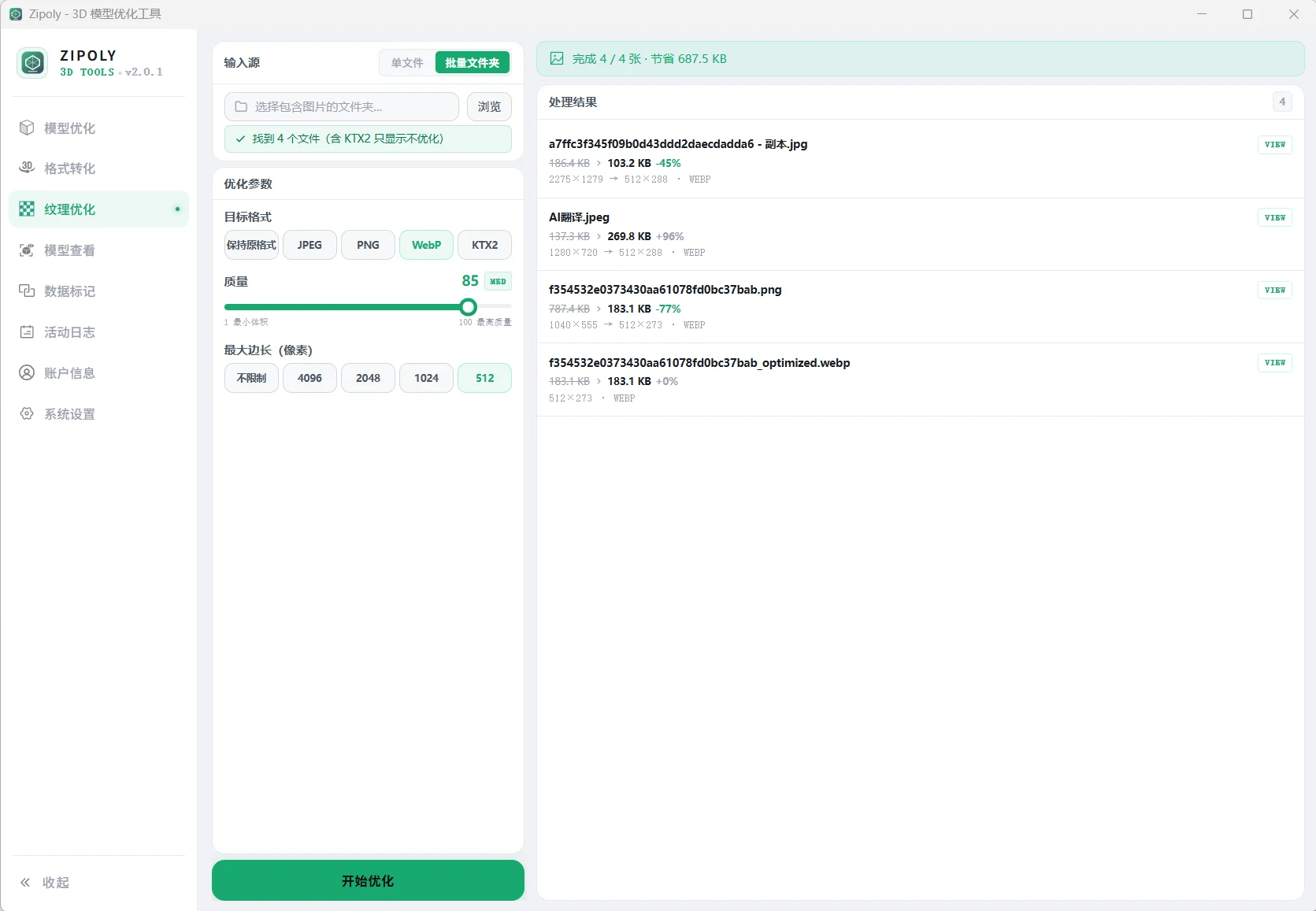
Output is saved next to the original file with an _optimized suffix; KTX2 output is named {original}_ktx2.ktx2.
Choosing an Output Format
| Format | Size | Quality | Compatibility | Best for |
|---|---|---|---|---|
| Keep original | — | Lossless | — | Rescaling only, no format change |
| KTX2 | Smallest | ETC1S lossy / UASTC near-lossless | Three.js only | Three.js projects chasing maximum load performance |
| WebP | ~30% smaller | Lossy | Modern browsers | General web use, balance of size and compatibility |
| JPEG | Medium | Lossy | Nearly everywhere | Maximum compatibility (Babylon.js / model-viewer etc.) |
| PNG | Largest | Lossless | Nearly everywhere | Transparency / lossless archiving |
KTX2 Parameters
| Parameter | Description |
|---|---|
| Compression mode | ETC1S (small size, lossy) / UASTC (high quality, near-lossless) |
| Quality | Fixed to a balanced value on this page; the 1–255 quality slider lives in the "Texture Settings" dialog on the compression page |
| Mipmap chain | Disabling saves ~33% size (requires matching loader code changes, see below) |
Which mode should I pick?
Use ETC1S for color maps (albedo / diffuse) — smaller files. Use UASTC for detail-critical textures like normal maps and specular maps.
When mipmaps are off, update your loader code
With mipmaps disabled, Three.js will still try to generate them by default, but KTX2 textures cannot be regenerated dynamically — this causes render warnings or visual glitches. Set it manually after loading:
texture.generateMipmaps = false
texture.minFilter = THREE.LinearFilter  // or NearestFilter
Loading KTX2 in Three.js
Prerequisites
KTX2 is a GPU-native format that browsers cannot decode directly — Three.js needs the Basis Universal Transcoder configured. This is a universal requirement of the KTX2 toolchain.
import { KTX2Loader } from 'three/addons/loaders/KTX2Loader.js'
import { GLTFLoader } from 'three/addons/loaders/GLTFLoader.js'

// renderer is your THREE.WebGLRenderer instance
const ktx2Loader = new KTX2Loader()
// Recommended: copy the transcoder files into your project's public folder (no external CDN dependency)
// cp node_modules/three/examples/jsm/libs/basis public/basis -r
ktx2Loader.setTranscoderPath('/basis/')
ktx2Loader.detectSupport(renderer) // picks the best sub-format for your GPU

// Load a GLB that contains KTX2 textures
const loader = new GLTFLoader()
loader.setKTX2Loader(ktx2Loader)
loader.load('model.glb', gltf => scene.add(gltf.scene))

// Load a standalone KTX2 file (not inside a GLB)
const texture = await ktx2Loader.loadAsync('texture_ktx2.ktx2')
material.map = texture
material.needsUpdate = true
KTX2 is not supported by Babylon.js or model-viewer
The KTX2 texture format (KHR_texture_basisu extension) is currently fully supported only in Three.js. If your project uses Babylon.js or model-viewer, choose JPEG or WebP instead.
FAQ
Is KTX2 necessary, or is WebP enough?
Depends on the target: for Three.js projects chasing maximum loading performance choose KTX2 (GPU-native decoding, zero CPU cost); if you need Babylon.js / model-viewer compatibility or want to skip KTX2Loader configuration, choose WebP (~30% smaller, broadly compatible).
ETC1S or UASTC?
Color maps (albedo / diffuse) use ETC1S — smaller. Normal and specular maps use UASTC — near-lossless quality but larger.
This tab or "Texture Settings" in compression?
For loose image files use this tab; for textures embedded in a GLB use Compression Optimization → Texture Settings.
Textures look wrong after disabling mipmaps?
KTX2 textures can't have mipmaps generated dynamically by Three.js — set texture.generateMipmaps = false and minFilter to THREE.LinearFilter after loading; see the warning block above.
References
- KHR_texture_basisu spec (Khronos — how KTX2 is defined in glTF)
- BinomialHZ/basis_universal — the open-source Basis Universal / KTX2 encoder
- KTX2Loader docs — transcoder configuration in three.js